Enjoy with us

Showing posts with label iPhone. Show all posts

The iPad Pocket Projector.


This is the pocket-sized projector that connects directly to an iPad to instantly display enlarged views of photos, movies, and presentations. Smaller than a smartphone and weighing less than 5 oz., the device plugs into an iPad's 30-pin charging port, turning any space into a movie theater without complicated setup or cables. Its 35-lumen LED produces 6" to 60" diagonal images from 8" to 78" away with a 4:3 aspect ratio. The projector's 640 x 480 pixel resolution ensures a sharp view, a manual focus wheel fine-tunes image clarity, and the iPad's speakers control the sound. With a free app, users can magnify or rotate images and project everything from YouTube videos to live Internet surfing sessions. The internal lithium-polymer battery provides two hours of projection and recharges via USB with the included cable. Also functions as a backup battery for an iPhone. LED is rated for 20,000 hours. Compatible with devices that use 30-pin connector, including third generation iPad, iPhone 4S, 4, 3GS, and third and fourth generation iPod touch. 3" L x 2 3/4" W x 1" D. (4 1/2 oz.)
Read more »

10 Best Kitchen Remodeling iPhone Apps


While most of us love the feel of pen and paper when drafting ideas for our dream kitchen, the sudden surge of remodel-related apps on the market makes reaching for your tablet or smartphone pretty tempting. After all, you're less likely to lose either of those, not to mention that this century's tech surge has left us with a slew of online tools that make even daunting tasks, like a kitchen remodel, more accessible. 
But which apps truly capture the functionality and vision needed to help a design project grow from concept to reality? Here are 10 that the design community is raving about.
1. Color Capture (Free)
This app lets you capture your favorite colors anytime, anyplace. Just take a picture of any color, and you'll receive an instant match from one of Benjamin Moore's 3,300+ paint colors. This capture process allows you to select the smallest color detail and then suggests a match from a library of options, with added benefits of viewing recommended color combos and locating your nearest retail supplier.
2. MoodBoard ($9.99)
If you love creating inspiration boards for interior design projects, you will love this popular app. Moodboard allows you to produce and share self-created boards on your iPad by collecting and organizing virtual design "clippings" that inspire you. It is a handy project management tool for passionate DIYers, with the ability to add links and personal styling by selecting board fonts, backgrounds and images related to each specific kitchen project.
3. Mark on Call ($2.99)
If you currently can't afford to hire a design professional, this easy-to-use app is like having a virtual interior design assistant in your back pocket. The app was recently updated to a 2.5 version, which manages your floor plans, shopping lists and even offers a tool that generates virtual room views, taking all the guesswork out of your design layout.
4. GoDesign ($9.99)
Created for kitchen design pros, and equally loved by them, this app allows you to track your clients, vendors and products all in one place. The clear navigation creates more streamlined project management with the added benefit of virtual tear sheets and user-friendly interfaces.
5. inchCALC ($1.99)
This practical calculator app takes all the guesswork out of your kitchen calculations, ensuring that you have precise and accurate planning information with little to no effort. As an added bonus, it also offers easy-to-read screen shots that generate tips on how to measure various spaces and shapes.
6. I.D. Wood ($4.99)
An ideal app for both design professionals and DIYers, this app allows you to view, search and identify a variety of wood options for your next kitchen project. Filled with detailed screen shots featuring botanical, regional, description and common use information, this app simplifies the process of selecting wood floors, cabinetry, countertops and accents for the home.
7. iHandy Carpenter ($1.99)
Perfect for the handyman (or woman), this app is like having a complete carpentry kit at the touch of a screen. The app offers clear graphics, easy-to-follow instructions and is powered with exact measurements to ensure that your next project is carried out with precision.
8. Photo Measures ($4.99)
Aptly named, this app allows you to take a photo of a kitchen space you need measurements for and then calculates the measurements for you. The added Organization feature creates easy reference and storage solutions for multiple design projects, making it one of the best loved design apps on the market to day.
9. ColorChange ($2.99)
Popular with DIYers, the Color Change app helps with any redecorating project by changing the color of your existing paint color in a captured image. Straight forward and simple to use, the Color Change app allows you to view multiple color variations and combinations until you find the perfect shade for your next design project.
10. Home Maintenance ($4.99)
A great tool for anyone with multiple projects to manage, this app is compatible with the iPhone and the iPad. Like having a personal home manager who keeps track of all your DIY, repair and maintenance tasks, this app allows you to capture a home project, generate a note for the task and assign an action date that syncs with your calendar to remind you to service your home.


Read more »

Helix Portable Battery Pack Charges Three Devices at Once

If you travel with several gadgets that all charge from a USB port and you need extra runtime, theLenmar Helix might be interesting. This device is a portable battery pack that features an internal 11,000 mAh rechargeable battery. It also features three USB ports allowing you to charge up to three devices at one time.
helix-12
One of those USB ports has an output of 2.4 A making it suitable for charging tablets like the iPad. The other two USB ports have standard one amp outputs for smartphones. The battery pack has LED indicators in the front to show how much power is left inside and it recharges via an included micro USB cable.
The battery pack also has a dedicated on-off button. The manufacturer promises that the battery pack can help your smartphone run up to seven times longer. The battery pack is available now for $99.99.
Read more »

XDModo solar charger sticks to the inside of a window to soak up the sun


Users can stick the 0.68-inch thick Window solar charger to the inside of a glass window with the photovoltaic panels facing out, and then feed off a charging cable to a portable device positioned in the cooling shade
Article Summary
I guess I'm lucky that I now live in a part of the world blessed with long sunny days that are perfect for juicing up the battery on my solar device charger. I do have to keep getting up and moving it, though, so that the panels don't fall into the shadows cast by furniture in the room or even the window frames themselves, and reducing its efficiency. Propping the charger up against the glass is one way to ensure maximum exposure to those energy-giving rays, but XDModo has a much slicker solution. Users can stick the 0.68-inch thick Window solar charger to the inside of a glass window with the photovoltaic panels facing out and then feed off a charging cable to a portable device positioned in the cooling shade.


Read more »

Kanex Foldable iDevice Stand for Smartphones and Tablets

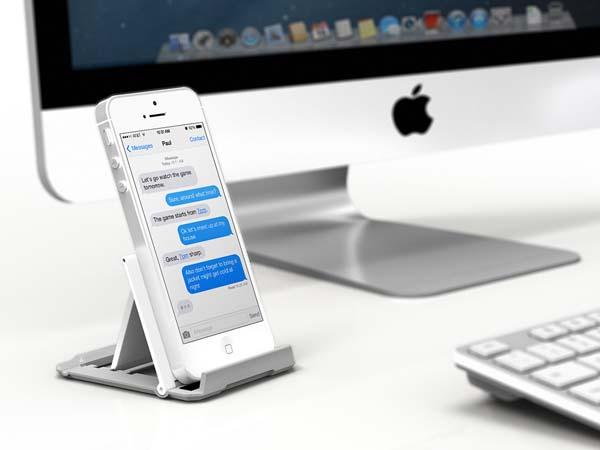
Need a convenient stand to hold your iPhone or iPad for hands-free entertaining? Take a look at Kane’s Foldable iDevice Stand, the universal stand may be a nice solution.


The Foldable iDevice Stand is a versatile universal stand designed foriPadiPhone and other smartphones and tablets. The universal standmeasures 2.8 x 3.2 inches, and as we can see from the images, it features sleek foldable design for portability, and is made of plastic for durability, using the universal stand you can keep your iPhone or iPad in portrait or landscape viewing mode, moreover, the adjustable tray offer three optional angles for optimal viewing experience.
Kanex Foldable iDevice Stand for Smartphones and Tablets

Kanex Foldable iDevice Stand for Smartphones and Tablets
The universal stand comes in a 2-pack, and costs $17.95 USD. If you’re interested, jump to
 Kanex official site for more details. Additionally, also don’t miss other nice options via “universal stand” tag.
Read more »

Apple iPad Air Smart Case Announced


Following the official announcement ofiPad Air, Apple also announced a new Smart Case for the tablet. If you’re curious, let’s go on checking the iPad Air case.
Apple iPad Air Smart Case Announced

This is an official folio protective case designed for iPad Air. As we can see from the images, the iPad Air case features form-fitting, ultra-slim design, and is made from beautiful, aniline-dyed leather along with a soft, color-matched microfiber lining in order to protect your iPad Air from bumps and scratches, and a choice of six rich colors makes your iPad Air more vivid. Moreover, the front cover doubles as an iPad stand to hold your iPad Air in landscape viewing mode or offer a suitable typing angle, of course, the Smart Case also features auto wake up/sleep function.
Apple iPad Air Smart Case Announced Apple iPad Air Smart Case Announced
Apple iPad Air Smart Case is available in 6 colors, each one is priced at $79 USD, while its polyurethane version costs $39 USD. If you’re interested, jump to Apple Store for more details.
Read more »

Apple iPad Air Announced

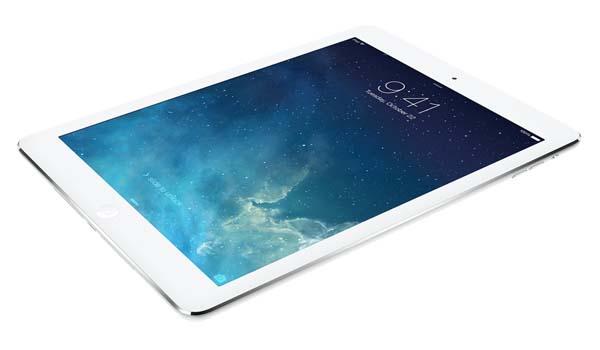
Apple finally announced its latest iPad Air at yesterday’s San Francisco event. If you’re curious, let’s go on checking the detailed features on the fifth-generation iPad.


Apple iPad Air is a high performance 9.7-inch tablet that measures 9.4 x 6.6 x 0.29 inches and weights 1 pound. As we can see from the images, iPad Air followed iPad mini’s ultra slim design, and is powered by A7 chip with 64-bit architecture and M7 motion coprocessor, moreover, iPad Air comes with a 9.7-inch LED-backlit multi-touch Retina display with IPS technology, 2048 x 1536 pixels resolution at 264 ppi and fingerprint-resistant oleophobic coating, 16/32/64/128GB internal storage, FaceTime HD camera with backsidillumination sensor and face detection, and 5-megapixel iSight camera with autofocus, face detection, backside illumination sensor, five-element lens, f/2.4 aperture and hybrid IR filter. Apart from that, iPad Air also has two antennas and MIMO technology for ultrafast WiFi, Bluetooth 4.0, optional LTE, Lightning port, buil-in 32.4-watt-hour rechargeable battery for up to 10 hours of use time.
Apple iPad Air is available in two colors and 4 storage capacities, and starting at $499 USD. If you’re interested, jump to Apple official site for more details.

Read more »

Apple iPhone 5C vs LG Nexus 4


ModelApple iPhone 5CLG Nexus 4 E960
General
Dual SimNoNo
Dimensions124.4 x 59.2 x 8.97 mm133.9 x68.7x 9.1 mm
Weight132 g139g
Display
Display TypeLED-backlit IPS LCD, capacitive touch screen, 16M colorsTFT LCD, ZeroGap Touch technology
Display Size640 x 1136 pixels, 4.0 inch1280×768 Pixels, 4.7 Inches
Software
Operating SystemiOS 7.0Android OS, v4.2 (Jelly Bean), upgradable to v4.2.1
BrowserHTML (Safari)HTML5
JavaNoYes, via Java MIDP emulator
Camera
Back Camera8 MP, 3264×2448 pixels, autofocus, LED flash8 MP, 3264 x 2448 pixels, autofocus, LED flash
Front Camera1.2 MP, HD (720p) recordingYes, 1.3 MP
FeaturesTouch focus, geo-tagging, face detection, panorama, HDR, Æ’/2.4 apertureTouch focus, geo-tagging, face detection, photo sphere
VideoYes, Full HD (1080p) recording  Yes, 1080p
Processor
CPUDual-core1.5 GHz Krait Quad-core Processor
ChipsetApple A6Qualcomm APQ8064 Snapdragon
GPUAdreno 320
Memory
RAM1 GB RAM2 GB RAM
Internal Memory16/32 GB8/16 GB
External MemoryNomicroSD, up to 32 GB
Battery
TypeLi-Ion Li-Po 2100mAh
Standby TimeUp to 250 hrs
Talk TimeUp to 10 hrs
Connectivity
3GYesYes, DC-HSDPA, 42 Mbps; HSDPA, 21 Mbps; HSUPA, 5.76 Mbps
4G [Market dependent]Yes
BluetoothYes, v4.0 with A2DPYes, v4.0 with A2DP
WifiWi-Fi 802.11 a/b/g/n, dual-band, Wi-Fi hotspotYes, Wi-Fi 802.11 a/b/g/n, dual-band, DLNA, Wi-Fi hotspot
 GPRS, EDGE, GPS,NFC and microUSB v2.0GPRS, EDGE, GPS and microUSB v2.0
Entertainment
Video PlayerYesYes
Audio PlayerYesYes
Ring ToneVibration, MP3, PolyphonicVibration, MP3, Polyphonic
SoundLoud Speaker, 3.5mm Audio JackLoud Speaker, 3.5mm Audio Jack
Messaging & Social NetworkSMS, MMS, IM, Email, Facebook, Twitter, YouTube, Google, etcSMS, MMS, IM, Email, Facebook, Twitter, YouTube, Google, etc
Others
ColorsWhite, Blue, Green, Yellow, PinkBlack
SensorsAccelerometer, Gyro, Proximity, CompassAccelerometer, Gyro, Proximity, Compass, Barometer
Read more »